I Was Hardcoding API Keys in My Projects. Then I Realized Why That's a Bad Idea.

VikizCode Team
June 11, 2026 · 6 min read
✨ AI-Generated Summary
I was leaving my API keys in public code, thinking it was harmless. Here is the story of how I learned the dangers of hardcoded secrets and how to use .env files instead.
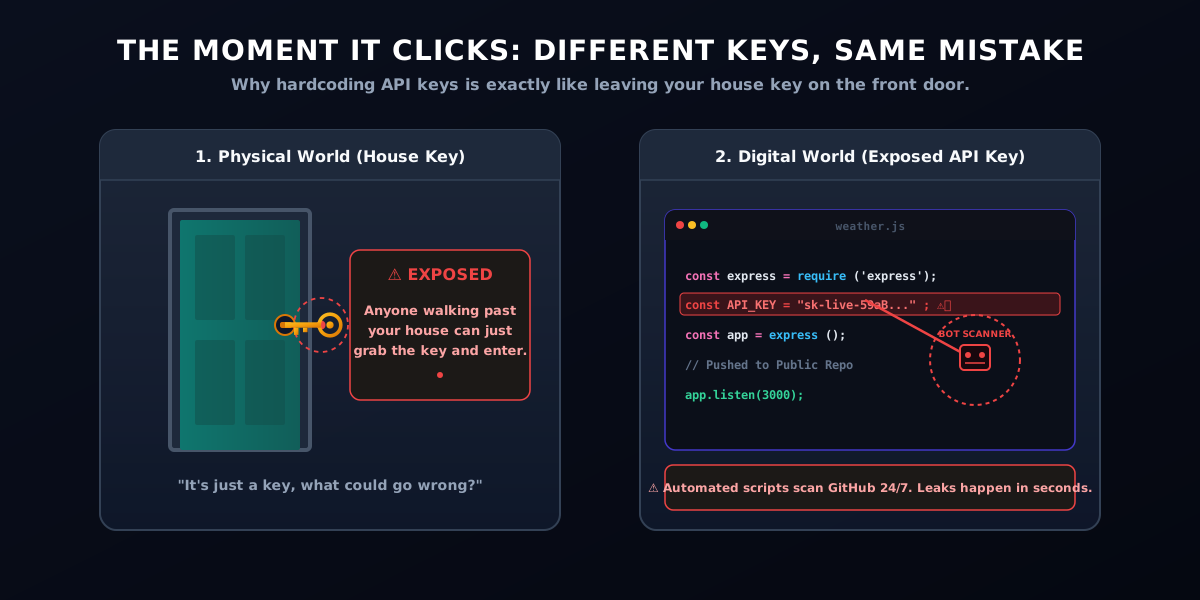
Imagine leaving your house key attached to your front door. That's closer to what I was doing than I realized.
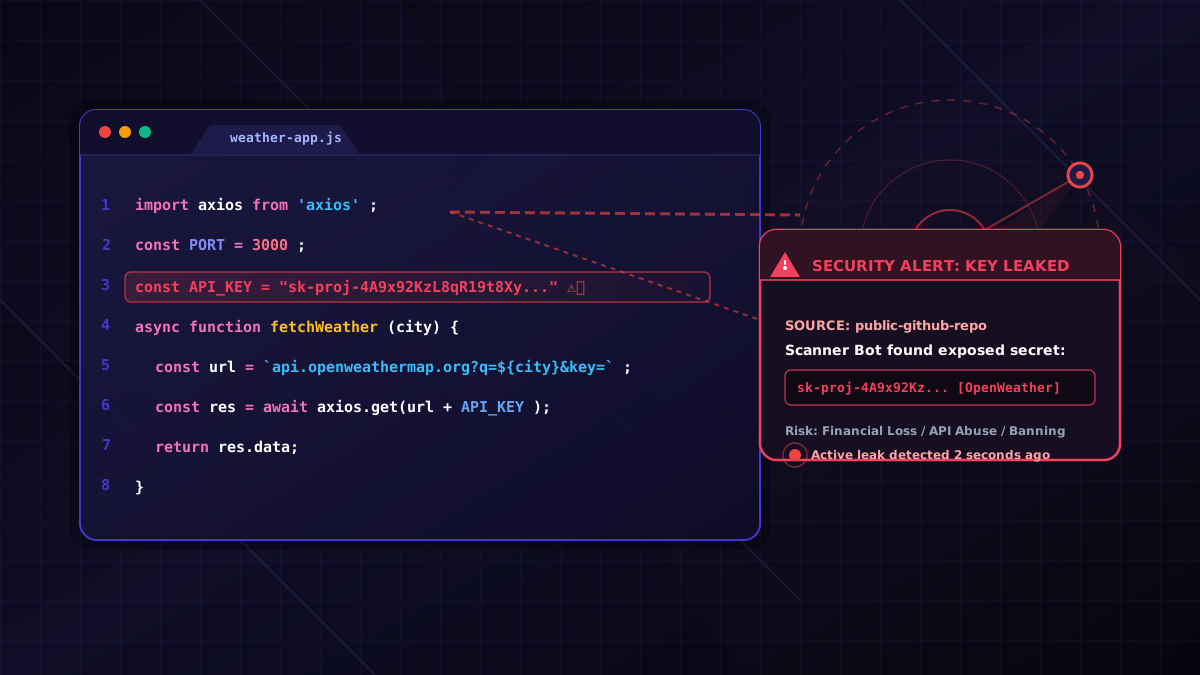
Whenever I built small projects using APIs—like a weather app pulling data from OpenWeatherMap or a movie dashboard using the TMDB API—I would simply write:
const API_KEY = "my-secret-key";It worked. The app fetched the data, the UI rendered beautifully, and I felt like a wizard. Most tutorials I watched online seemed to do something similar. They would paste their API key directly into the code just to get the project up and running quickly. So, I never questioned it. I only cared about making the project work and seeing those green checkmarks.
I pushed my code to GitHub, shared the link with my friends, and went to bed. What could possibly go wrong?
The Mistake I Didn't Realize I Was Making
As beginners, we are focused on functionality. We want to see our React components load, our API requests return a 200 OK status, and our CSS look decent. We aren't thinking about production-grade practices or security configuration. When we see a code snippet in a tutorial showing const API_KEY = "xyz", we assume that’s the standard way to do it.
It feels normal because the key is right there next to the code that uses it. You don't have to worry about additional config files or importing modules. But what tutorials often hide is that they are simplifying things for demonstration purposes. They don't show the setup of environment variables because they don't want to add three extra minutes to the video and risk losing the viewer's attention. In the real world, however, hardcoding keys in public files is one of the most common security mistakes a developer can make.
The Moment It Clicked
One day, I was chatting with a senior student who was reviewing my portfolio. He opened one of my GitHub repositories, pointed at a file, and said, "You know anyone can just copy your API key and use it, right?"
That was the moment the analogy clicked: Imagine leaving your house key attached to your front door.
Anyone walking past your door could just grab it and walk right in. When you hardcode an API key inside code that gets pushed to a public GitHub repository, you're doing the exact same thing. Public repositories are open to the entire internet. And it's not just humans who can see it; automated bots scan GitHub 24/7 looking for exposed keys, passwords, and tokens. Within seconds of a push, your key can be in someone else's hands.
What Actually Happens When API Keys Leak?
When I first realized this, I wondered: Okay, but I'm just a student. Who would want to steal my weather API key? It turns out, bots don't care who you are. They just want access. Understanding developer security starts with knowing what happens when credentials leak. Here is a quick breakdown of common mistakes and their immediate results:
| Mistake | Result |
|---|---|
| API key exposed | Anyone can use it |
| No usage limits | Unexpected API consumption |
| Public repository | Automated bots can scan it |
Without proper secret management, a leaked key can quickly lead to:
- Exhausted API Limits: Bots will drain your daily quota in seconds, causing your application to stop working.
- Unexpected Bills: If your API account has a credit card linked (like OpenAI or AWS), a leak can rack up bills of thousands of dollars overnight.
- Abuse of Services: Malicious actors can use your identity to scrape data or send spam, getting your developer account blacklisted.
The Better Way I Found: .env Files
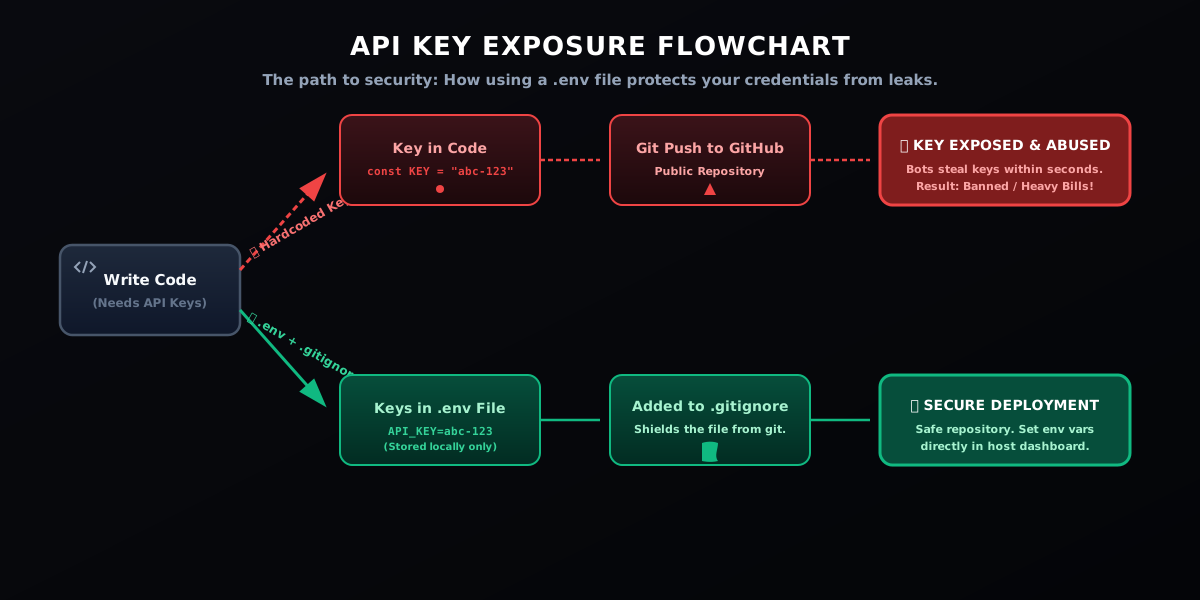
So, how do we keep our keys working while keeping them safe? The solution is standard in professional web development: using environment variables stored in a .env file for proper secret management.
A .env file is a simple, plain text file that sits in the root directory of your project. It contains key-value pairs of your sensitive configuration. Since the file is stored locally on your machine, it never gets pushed to GitHub—provided you add it to your .gitignore file.
⚠️ Crucial Technical Check
For backend secrets, keep API keys server-side. Never expose private keys inside frontend code. Make sure to understand that a .env file protects secrets during development, but it does not automatically make frontend-exposed keys private once built and deployed. If your React or Vue frontend code directly references a private key, that key will still be compiled into the static JavaScript files sent to the user's browser, where anyone can inspect them.
Here's how easy it is to set up:
1. The Old, Dangerous Way (Hardcoding):
// app.js
const API_KEY = "my-secret-key-12345"; // Exposed to everyone!
2. The Safe Way:
Create a file named .env in your project's root folder:
# .env
API_KEY=my-secret-key-12345
Then, read the key in your JavaScript file using process.env:
// app.js
const API_KEY = process.env.API_KEY; // The key remains hidden in code!
| Hardcoded API Key | .env File |
|---|---|
| Stored directly in code | Stored separately |
| Easy to accidentally upload | Easier to protect |
| Shared with repository | Can remain private |
| Risky for public projects | Safer approach |
💡 Crucial Step: The .gitignore File
None of this works if you still upload your .env file. Make sure to open your .gitignore file and add .env to a new line. This tells Git to completely ignore the file, keeping it safely on your local computer.
✔ Developer Security Checklist (Before Pushing to GitHub)
- ✔ Remove API keys from source code
- ✔ Check .env files are kept locally
- ✔ Update .gitignore file to include .env
- ✔ Rotate leaked keys immediately if exposed
- ✔ Review commits and diffs before pushing to GitHub
What Changed In My Projects
Once I started using .env files, I noticed a change in how I approached building apps. It wasn't just about security; it was about adopting a more professional developer mindset.
I stopped treating my code like a collection of temporary scripts and started treating it like a real application. I realized that writing code that works is only the first step. Making it clean, configurable, and secure is what turns a student project into something to be proud of. It made me feel like I was transitioning from just playing around with tutorials to actually building code the way the industry does.
Lessons I Learned
Looking back on my mistake, here are the main lessons I carried forward:
- Just because code works doesn't mean it's safe. Functional code is not the same as secure code. It’s always worth checking if there are hidden vulnerabilities in your setup.
- Small habits matter. Creating a
.envand.gitignorefile takes less than 30 seconds, but it saves you from major headaches down the road. Make it a default habit for every new project. - Learning happens through mistakes. Many developers make this mistake while learning. The important part is building better habits early, especially around developer security and secret management. Don't feel bad if you've done this; it's a normal part of the learning process.
- Understanding why something exists is as important as using it. Don't just follow tutorials blindly. Take the time to understand why tools like environment variables or build tools are recommended.
Conclusion
Looking back, hardcoding API keys wasn't a huge mistake—it was simply something I didn't know. When we are learning, we can't possibly know everything from day one.
The important part wasn't avoiding mistakes altogether. It was learning from them before they became bigger, more expensive problems.
So, if you currently have a project sitting on GitHub with an API key pasted right there in the source code, don't panic. Take five minutes today: create a .env file, add it to your .gitignore, rotate your leaked API key on the service provider's site, and secure your project. You'll be one step closer to coding like a professional.
Save this before starting your next project. Have you ever accidentally leaked a key or made a similar mistake? Let's discuss in the comments!
Stay Updated with VikizCode 🚀
Join us to get fresh web dev guides, AI tools, and deployment tips directly in your inbox.
NO SPAM. JUST PURE GEEKY GOODNESS.
