Your Git History Is a Public Diary. Right Now, It's Embarrassing.

VikizCode Team
July 2, 2026 · 7 min read
✨ AI-Generated Summary
Most students never think about their commit history until an interviewer asks them to walk through it. Here's why 'fix', 'final', and 'asdf' are quietly costing you more than you think — and the two habits that fix it for good.
Go open your oldest GitHub repo right now. Scroll through the commit history. I'll wait.
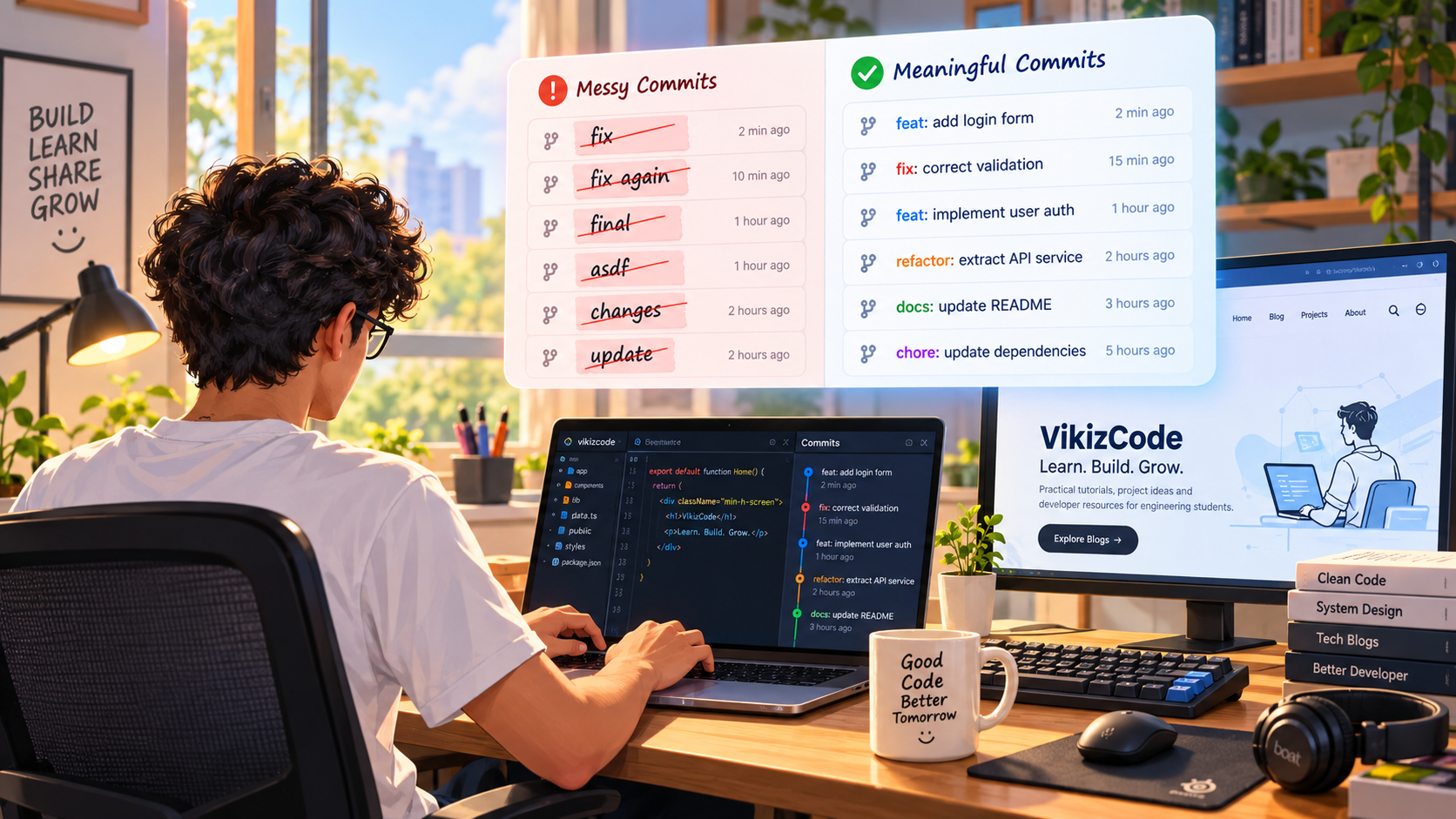
Found it? "fix". "fix again". "final". "final2". "actually final this time". "asdf" (we've all been there at 2 AM). Every developer has a repo like this somewhere, usually from their first few months of writing code. It's not a big deal — until someone else actually looks at it.
And someone will. A recruiter clicking through your GitHub before an interview. A teammate trying to figure out what changed in a group project. Future-you, six months from now, trying to remember why you touched that one file.
Why This Matters More Than It Seems
Commit hygiene feels like one of those "senior developer" concerns that doesn't apply to a student project. It's not. Here are three moments where it quietly costs you:
1. The interview walk-through
"Can you walk me through this project's GitHub?" is a completely normal interview question. If your commit history reads like a panic log, it doesn't matter how good your code actually is — you look disorganized before you've said a word. A clean history does the opposite: it shows you think in steps, and you can explain your own work.
2. The group project teammate
Your teammate opens the repo to see what changed since yesterday. Every commit says "update" or "changes". Now they have to read every line of every diff just to understand what you actually did, instead of skimming a commit list that tells the story for them.
3. Future-you, six months later
You come back to an old project to reuse a piece of it. Something's broken. You run git log hoping to find where it changed. Every message says "fix" or "update". git blame is technically working, but it's useless, because nothing it shows you actually explains anything.
💡 The real insight
Your commit history isn't for Git. It's for humans — including the future version of you who has completely forgotten why any of this code exists.
The Real Cost of Committing Straight to Main
Here's the other habit that quietly hurts you: pushing every single change directly to main, even on a solo project. It feels harmless when it's just you. It isn't.
When everything lives on main, you lose your safety net. Want to try something risky — a new library, a big refactor, an experimental feature — right before a demo or deadline? There's no clean way back if it breaks something. You're now debugging under pressure, on the same branch your working project depends on, with no undo button.
⚠️ A familiar scenario
It's the night before your viva. You want to add "just one more feature" to impress the examiner. You commit straight to main. It breaks the login page. Now the whole project is down, the night before you need to demo it.
A Commit Message Convention That's Actually Easy to Keep
You don't need a 40-page style guide. A lightweight version of "conventional commits" covers almost everything a student project needs: a short prefix describing the type of change, followed by a specific description of what actually happened.
feat:— a new feature or capabilityfix:— a bug fixrefactor:— restructuring code without changing behaviordocs:— documentation or README changeschore:— dependency updates, config, cleanup — the boring-but-necessary stuff
Before and after, same actual changes
| Before (vague) | After (specific) |
|---|---|
| fix | fix: correct email regex on signup form |
| update stuff | refactor: extract auth logic into a helper |
| final version | feat: add dark mode toggle to settings |
| asdf | chore: update dependencies, remove unused imports |
Notice the "after" column doesn't take longer to write. It's the same length, sometimes shorter than the vague version. The only difference is you're describing what you actually did instead of describing your emotional state at the time.
Branch-Per-Feature, Kept Simple
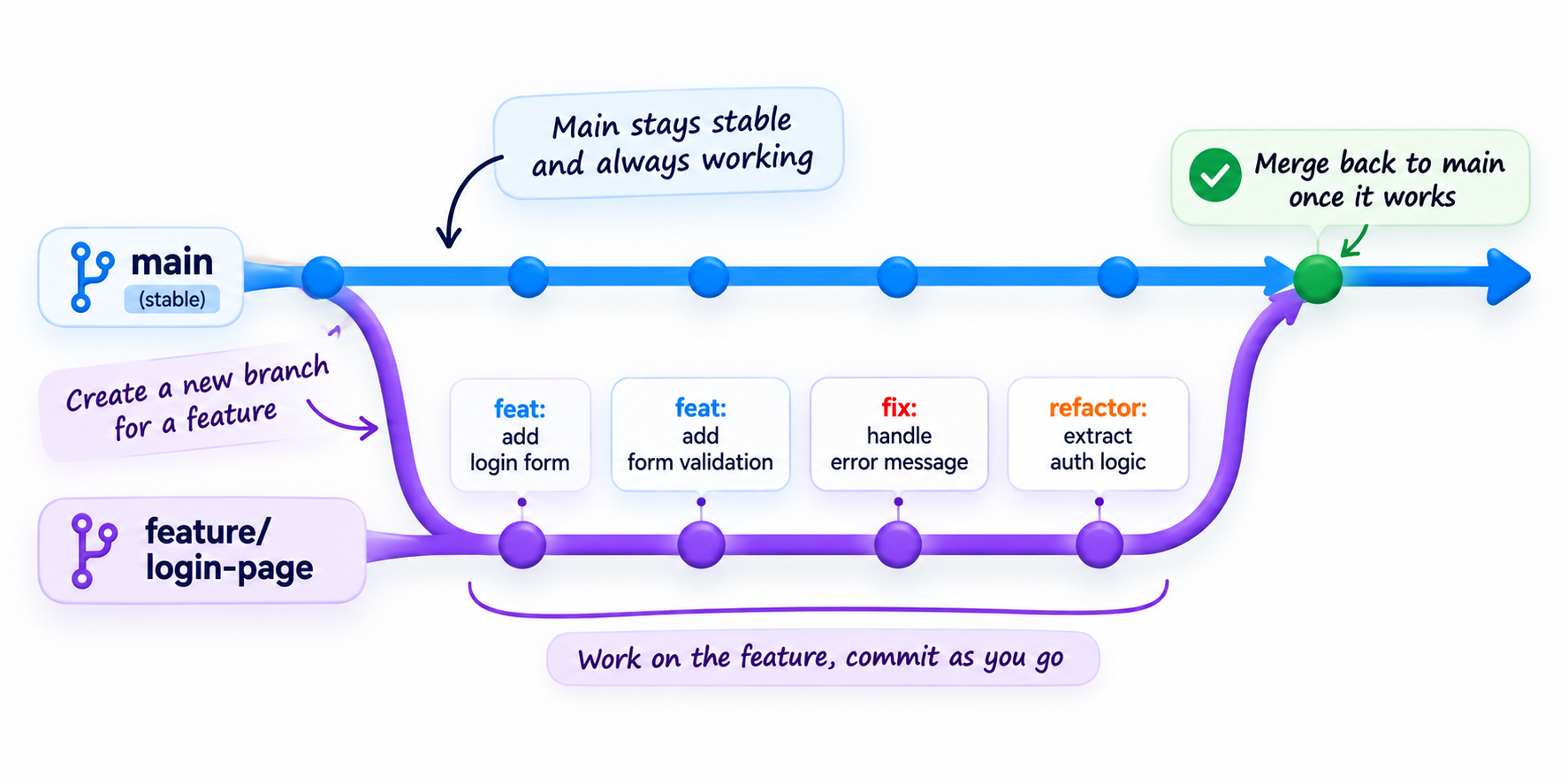
This doesn't need to be complicated. The whole habit is one rule: main stays stable, new or risky work happens on its own branch.
# Before starting anything new or experimental
git checkout -b feature/login-page

# Work normally, commit as you go
git add .
git commit -m "feat: add login form validation"

# Once it actually works, merge it back
git checkout main
git merge feature/login-page
That's it. No pull requests, no CI pipeline, no team process required for this to be worth doing solo. The entire benefit is psychological: you can experiment freely on a branch, knowing that if it goes badly, main is untouched and your project still works. This isn't "professional overkill" for a student project — it's exactly the kind of thing that costs nothing and saves you the night before a deadline.
Your Commit Hygiene Checklist
✔ Start doing this today
- ✔ Never commit with just "fix" — say what you fixed
- ✔ One logical change per commit, not five unrelated things bundled together
- ✔ Write the message assuming a stranger reads it a year from now
- ✔ Create a branch before starting anything experimental
- ✔ Only merge to main once it actually works
- ✔ Re-read your last 5 commit messages right now — fix any that just say "fix"
Final Thought
Real engineering growth comes from shipping something, breaking it, fixing it, and being able to explain exactly what happened — that's the whole point of building in public instead of just building. A clean git history is the actual proof-of-work for that process. It's not decoration. It's the first thing a recruiter, a teammate, or future-you will actually look at.
Go rename nothing — you can't rewrite history that's already public. But your next commit? That one's still yours to get right.
Stay Updated with VikizCode 🚀
Join us to get fresh web dev guides, AI tools, and deployment tips directly in your inbox.
NO SPAM. JUST PURE GEEKY GOODNESS.